Classic TWS Edit Menu
Instructions
The Classic
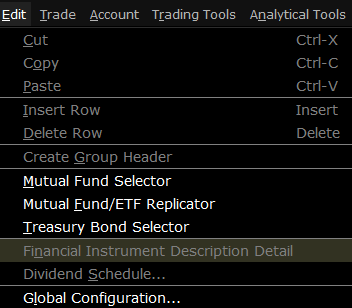
| Menu Command | Description |
|---|---|
| Cut | Cuts the selected ticker. |
| Copy | Copies the selected ticker. |
| Paste | Pastes the last copied or cut ticker as a new row. |
| Insert Row | Inserts a blank row above the selected row. |
|
Delete Row |
Deletes the row you have selected. |
| Create Group Header | Inserts a non-data row into the page. Enter a title or label to use this row as a separator or label for a group of tickers. |
| Mutual Fund Selector | Opens the Contract Selection box showing available families of no-load mutual funds. |
| Mutual Fund/ETF Replicator | The Mutual Fund Replicator finds an ETF(s) whose performance parallels that of a user-specified mutual fund. |
| Treasury Bond Selector | Opens the Contract Selection box showing available T-Bonds, Bills and Notes. |
| Financial Instrument Description Detail |
Displays the Ticker Description box which contains information about the selected underlying. |
| Dividend Schedule | Opens the Dividend Editor window. |
| Global Configuration | Opens the |