Mosaic File Menu
Instructions
The Mosaic File Menu consists of Layout, Application Settings, and Lock, Exit, & Restart file options.
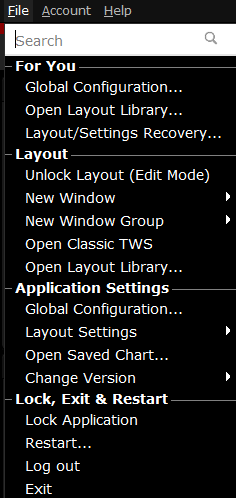
| Menu Command | Description |
|---|---|
| Layout | |
| Unlock Layout (Edit Mode) | Unlocks the Mosaic frame to allow you to edit, including adding and removing tools and resizing windows. |
| New Window | Provides access to most |
| New Window Group | Create a new workspace based on a blank frame on Mosaic or Classic |
| Open Classic |
Available only when there is no version of Classic |
| Open Layout Library... | Browse and add the predefined layouts. |
| Application Settings | |
| Global Configuration | Opens Global Configuration which includes configuration pages for all |
| Layout Settings |
|
| Open Saved Chart... | Allows you to select and open a previously saved interactive chart. |
| Change Version | Switch the |
| Lock, Exit & Restart | |
| Lock Application | Locks the application and requires a password to unlock. |
| Restart... | Restart the application. This will shutdown the window and reopen. |
| Log out | Log out of |
| Exit | Shuts down the application and saves settings. |