Classic TWS File Menu
Instructions
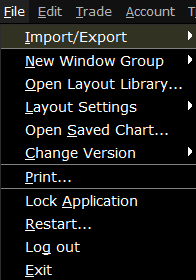
Use commands on the File menu to export reports to your PC, save settings and create a basket file. The File menu commands are described in the table below.
| Menu Command | Description |
|---|---|
| Import/Export | Allows you to import or export contracts, or export the contents of the quote monitor to Excel or to another quote monitor. |
| New Window Group | Create a new workspace based on a blank frame, Mosaic or Classic |
| Open Layout Library... | Allows you to open the |
| Layout Settings |
|
| Open Saved Chart | Allows you to select and open a previously saved interactive chart. |
| Change Version | Allows you to change the current version of |
| Prints the active page. | |
| Lock Application | Locks the application and requires a password to unlock. |
| Restart... | Restart the application. This will shutdown the window and reopen. |
| Log out | Log out of |
| Exit | Shuts down the application and saves settings. |