Options
Instructions
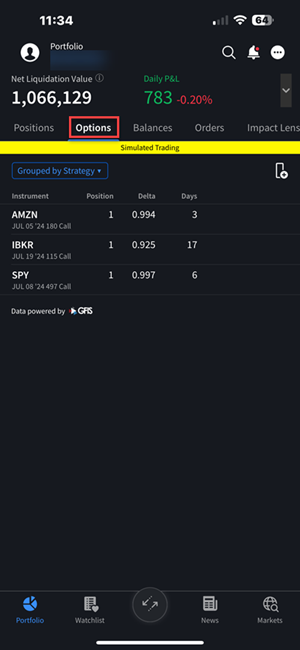
The Options sub-tab within the Portfolio allows investors to view and manage their Options positions more easily by providing Options-centric data and information. To navigate to this tab, please take the steps outlined below.
-
Tap the Portfolio icon from the tab bar.
-
Click the Options tab.
-
The current open options positions will populate on this screen.
-
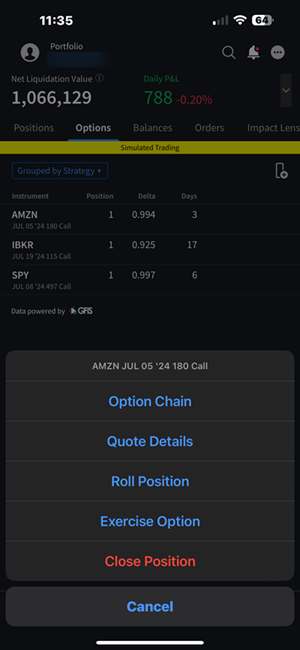
Click an option position to take the following actions:
-
Option Chain
-
Quote Details
-
Roll Position
-
Exercise Option
-
Close Position
-
-
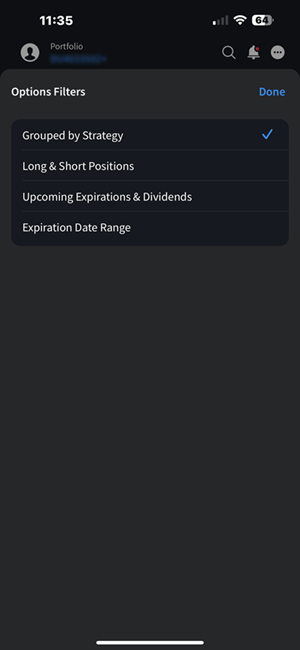
Click the drop-down menu in the top left corner to select the option filters. You may view positions:
-
Grouped by Strategy
-
Long & Short Positions
-
Upcoming Expirations & Dividends
-
Expiration Date Range
-
-
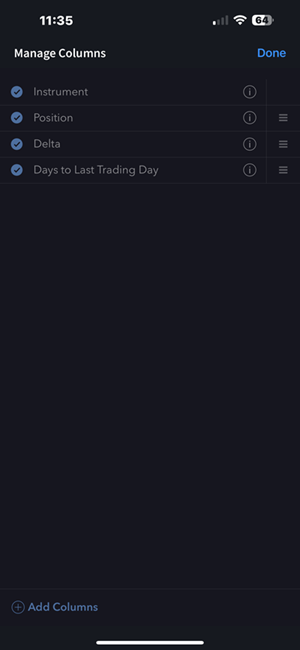
To edit the order of columns shown, select the filter
 icon. Click the reorder
  icon and drag the columns to the desired order.