Deposit Funds
Instructions
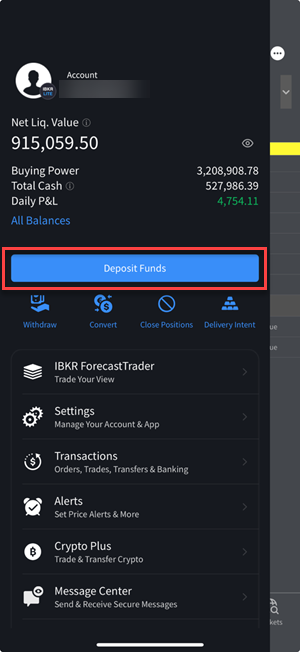
In the Deposit
To deposit funds:
-
Tap the
-
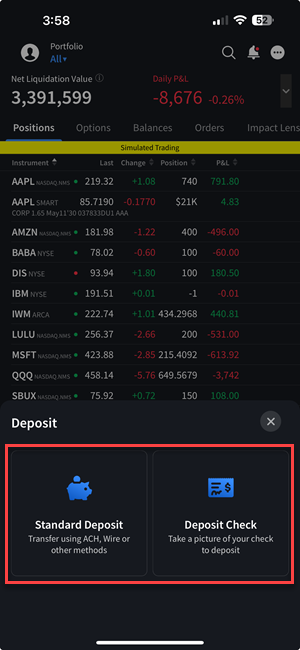
Select between a Standard Deposit or Deposit Check.
-
 Standard Deposit
-
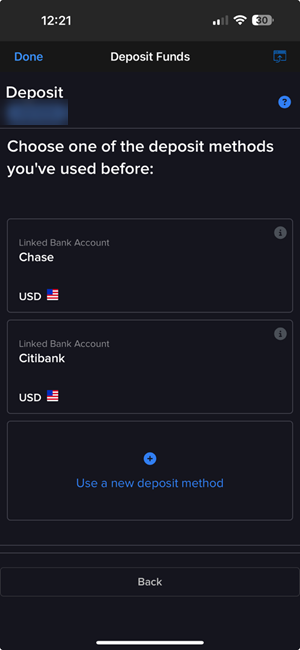
Select a deposit method you have used before or use a new deposit method to initiate a deposit notification.
-
We support the following types of deposit notifications:
- Wire - Same day electronic movement of funds through the fed wire system. You must contact your bank to initiate a wire and include your account name and number on the wire. Specific wire instructions and addresses will be displayed during the deposit process. Wire deposits arrive immediately to four business days, depending on your bank. Non-U.S. banks are generally at the longer end of the range. Credit to account is immediate upon arrival.
- ACH - Your transfer request will automatically be processed through a message sent to your bank by IB. Prior to using this method, you will need to create a standing instruction through Transfer & Pay which authorizes IB and your bank to electronically transfer funds between the two accounts. You will then be prompted to verify a series of test transactions issued to your bank account several days later to establish the link. Once established, this transfer method can be used for future deposit and withdrawal requests.
- Bill Pay (online bill payment check) - A check or electronic fund transfer that originates from an online payment service provided by your Infinancial institution. For US checks, you add us to your personal payee list and your bank mails a check for you. For electronic fund transfers, you select us from your bank's list of merchants and your bank sends an electronic payment. Electronic fund transfers are credited to your account immediately. US checks will be credited to your account after seven business days.
- Transfer from Wise Balance - Link your Wise profile, then initiate a fund transfer from your Wise multi-currency account to your IBKR account.
- BPAY Notification - Online bill payment for Australian dollars only
- Wire Notification (CNH) - Chinese Renminbi only
- Wire/SEPA Notification - Euros only
- eDDA - Electronic Direct Debit Authorization. A Transfer Service in Hong Kong that provides clients with a fast and convenient way to draw funds, in HKD or CNY, from their Hong Kong bank account to credit their IBKR account. Once the initial eDDA setup request has been confirmed by your bank, you can top up your IBKR account at any time by simply confirming the transfer amount.
-
Deposit notifications are easy to complete. All required information appears as a form that you complete on a single page - as you fill in a field or make a selection, the next part of the notification form appears.
-
In the Recurring Transaction section, decide if you want to save this deposit or deposit notification as a recurring transaction.
If you would like to save this deposit notification as a recurring transaction, select the check box and complete all the fields and selections in that section, including a name for the recurring transaction, the frequency of recurrence (Monthly, Quarterly or Annually), and a Start Date. If you do not want to save this transaction as a recurring transaction, do not select the check box.
-
-
Mobile Check Deposit
-
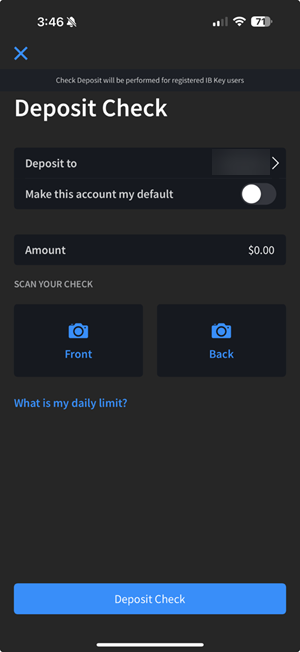
In the Deposit To field, select the appropriate account if you hold multiple accounts
-
In the Amount field, enter the amount of the check
-
Tap Front and position the field over the front of the check until the check scans
-
Tap Back and position the field over the back of the endorsed check until the check scans
-
Tap Deposit Check when complete
To be eligible to deposit a check using IBKR Mobile Check Deposit:
-
You must be an IBLLC-US client
-
The check must be drawn on a US bank
-
The check must be “Payable To” the customer
-
It cannot be the first deposit into a new account
-
The check must be properly endorsed (on the back). To avoid potential delays, endorse with "For mobile deposit only UMB Bank FFC IBKR and sign your name"
-
All handwriting must be clear and readable
-
Check amount cannot be more than the mobile deposit limit: $10K per day & $50K per month
-
The date on the check must be within the 90-day window
-
The date on the check cannot be “future-dated”
-
You must have IBKR Mobile Authentication (IB Key) installed on your mobile device
Acceptable/Unaceptable Check Types
If you are unable to send a wire transfer, we will accept bank checks made payable to Interactive Brokers LLC (denominated in US dollars only) or personal checks made payable to Interactive Brokers LLC (denominated in US dollars and from a US bank account). Checks will not be accepted unless they include your account name and account number.
If you fund your account with a bank check, the check must state one of the following descriptions for us to properly identify the check as a bank check:
-
Treasurer's Check
-
Cashier's Check
-
Teller's Check
-
Banker's Check
-
Official Check
If your bank check does not have one of the above titles stated on the check, or if your check is issued by a credit union or bill payment service, Interactive Brokers will book the funds according to our personal check policy.
Note: There is a 6-day hold period for Mobile Check Deposits. The hold period will begin the same day as the deposit if the mobile check deposit is received by 5pm EST.
IRA accounts are restricted from using the Mobile Check Deposit function. -