Retirement Plan Information
Instructions
The Retirement Plan Information section consists of the below tabs.
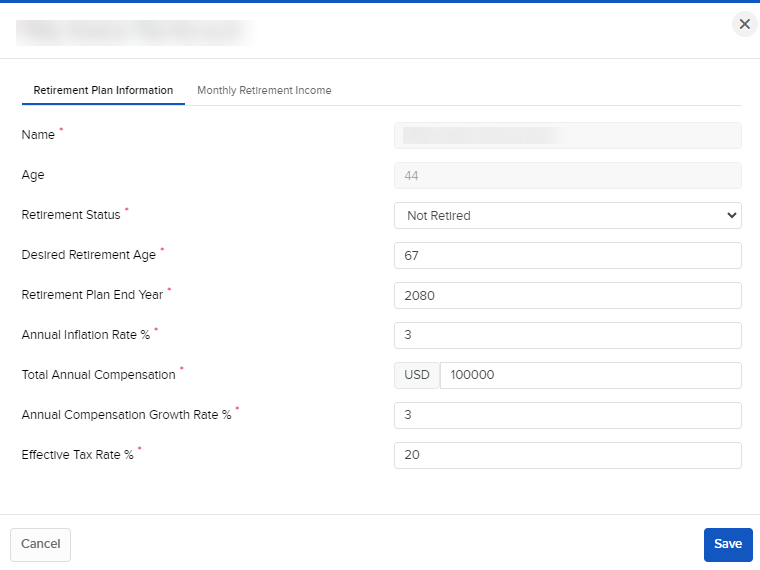
Retirement Plan Information
-
Name - This field is prefilled from existing user/account data and is not editable by the user.
-
Age - This field is prefilled from existing user/account data and is not editable by the user.
-
Retirement Status - This field is defaulted to 'Not Retired' and may be changed by the user at any time.
-
Desired Retirement Age - This field is not prefilled, must be provided by the user and may be changed by the user at any time.
-
Retirement Plan End Year - This is the final year of the plan. It is not prefilled, must be provided by the user and may be changed by the user at any time.
-
Annual Inflation Rate % - This field is prefilled/defaulted to 3% and applies to the length of the plan, including post-retirement. The user may change it at any time.
-
Total Annual Compensation - This field is prefilled from existing user/account data (Lower Band of Net Income) and may be changed by the user at any time. It should include salary, bonus, commissions, etc.
-
Annual Compensation Growth Rate % - This field is prefilled/defaulted to 3% and may be changed by the user at any time.
-
This is the average annual rate the user expects their total compensation to grow.
-
-
Effective Tax Rate % - This field is prefilled/defaulted to 20%. It is applied to the user's expected taxable distributions post-retirement and may be changed by the user at any time.
Monthly Income
-
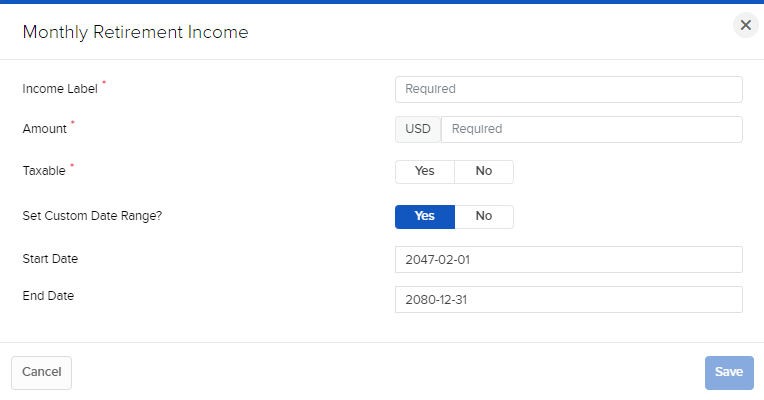
Income Label - Enter a Label for your Monthly Income.
-
Amount - Enter the Monthly Income Amount.
-
Taxable - Select Yes or No.
-
Set Custom Date Range? - Select Yes or No. If you select yes, you will be prompted to enter a Start and End Date.