Lock and Exit
The Lock and Exit setting allows you to Auto lock, Auto Logoff, or Auto Restart the desktop application. To do so, please take the steps outlined below.
 Auto Restart Considerations
You have elected to have your trading platform restart automatically on a daily basis. This procedure will require manual authentication once a week, the first time you log into the platform after the security tokens have been invalidated, a security process that occurs each Sunday at 1:00 am ET.
There are several factors outside the control of
-
If your machine is in sleep or hibernation mode, or happens to have no power when the restart is scheduled to occur.
-
If your machine is installing operating system updates that trigger an automatic system restart when complete.
In rare cases, for example for security reasons, we may need to revoke the authentication token, causing your platform to require manual authentication once the restart competed.
Having your trading platform constantly up and running exposes it to the risk of being accessed by unauthorized persons. We therefore strongly recommend that you consider the following security measures:
-
Use a higher level of access control and protections for the operating system account profile, the physical machine running your trading platform, and the premises where it is located.
-
Keep the account protected with two-factor authentication through Mobile authentication (IB Key).
Lock Parameters
-
Lock trading system after ___ minutes of inactivity - Locks your workstation if no activity has occurred for a defined number of minutes. Once locked, you must unlock the application using your system password.
-
Never lock trading system - check to remove auto-locking mechanism.
-
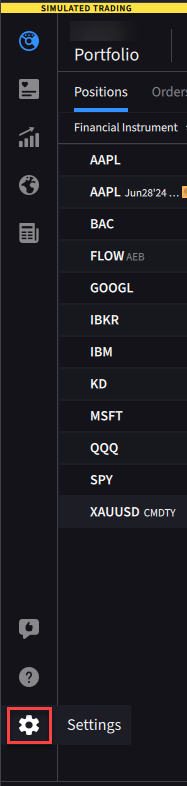
Click the Settings Icon.
-
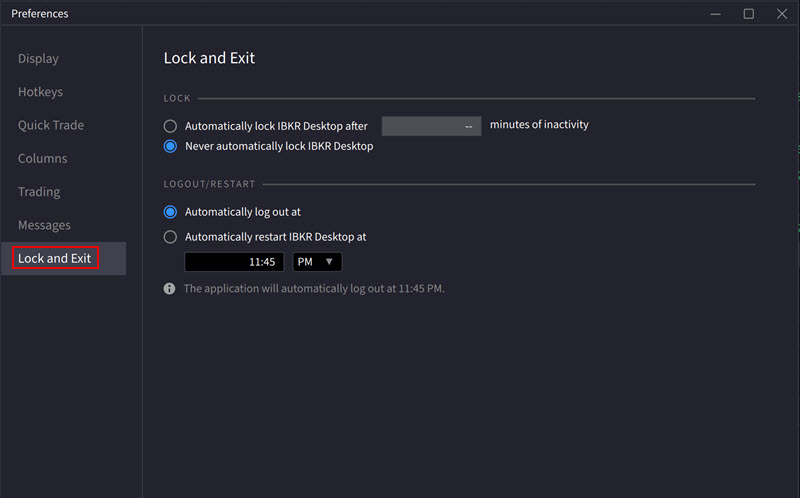
Click the Login tab.
-
Under the Lock section, select Automatically lock
-
Under the Logout/Restart section, Select Auto logoff at... or Auto restart at... and adjust the HH:MM and AM/PM time election.
-
Close out of the window to save these changes.