Set Ticket Notification Preferences
If you prefer, you can tell IB to send you additional notification when an inquiry ticket is updated. You can be notified via email, TWS or SMS (Short Message Service) on your mobile telephone.
- Click Support. The Message Center appears.
- Click Preferences in the top right corner of the Message Center.

The Message Preferences window appears.
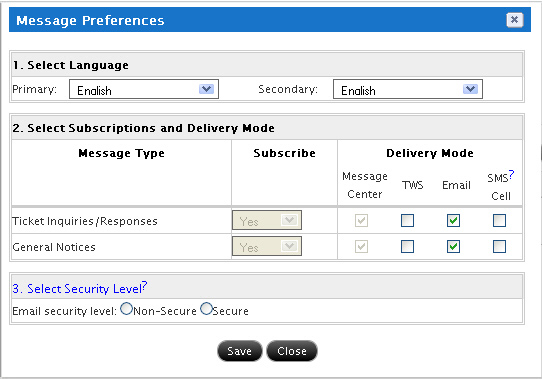
- Select a primary and secondary language for messages.
- For each Message Type, select one or more the three available notification methods (TWS, Email or SMS) by clicking the appropriate check box.
- For email and SMS notification, select Secure or Non-Secure by clicking the appropriate radio button.
- Secure notification - you will be send a generic notification that contains no private information.
- Non-secure notification - you will receive the actual reply content. Note that this option may result in the content being viewable by an unauthorized third party.
- Click Save.