Tax Forms
Instructions
You can view and print annual tax forms for the last five years on the Tax screen. Note that tax forms are not required or generated for US corporations. Tax forms available on this page include:
- 1099 forms, Gain Loss Reports and Dividend Reports for individuals, joint account holders and trusts in the United States.
- Forms T3, T5, and T5008 and Dividend Reports for Canadian individuals, primary joint account holders and trusts. . Quebec residents will also receive a Form RL-3.
 Notes for Some Canadian Accounts
Some Canadian accounts have two separate sets of 2013 tax forms that correspond to two separate accounts, one open and one closed. We only display the set of tax forms for one of those accounts on this page.
To see the tax forms for the other account, open the Account Selector and select it.
If you do not see the Account Selector, then you only have one set of tax forms.
- Non-US and non-Canadian individuals, primary joint account holders and trusts will receive Form 1042S as well as a Dividend Report.
View and Print Tax Forms
-
Click Statements & Reporting in the top left corner and select Tax Documents.
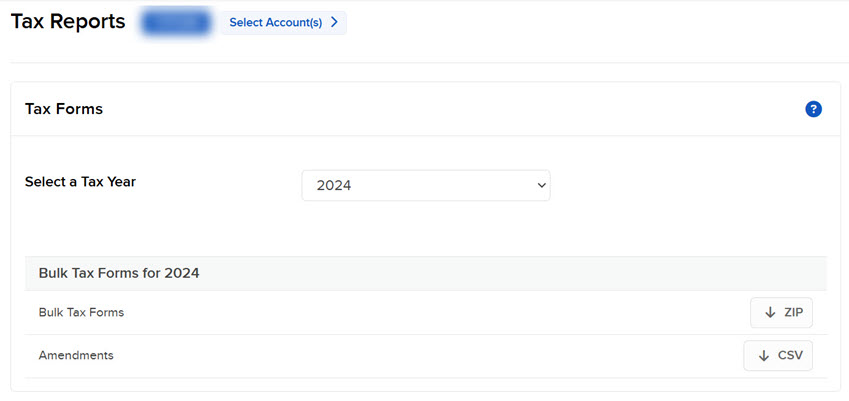
The Tax Reporting screen opens.
-
If you have a multiple account structure such as an institutional account or multiple linked accounts, use the Account Selector at the top of the page to select the account on which to report. To view tax forms for a closed account, select the Include Closed Accounts check box, and then the closed account.
-
Select the Tax Year for which you want to view tax forms. A list of available forms appears.
-
Each form is available in several output formats (HTML, Excel or PDF). Select the format you need.
-
If prompted, save the form to your computer.
Note: When there are more than one tax forms or statements available the Download All button will appear.